I Own Four Keyboards and One Layout — and One Thing I Couldn’t Unify
I own four keyboards. Different switches, different sizes, bought years apart.
They all run one layout. Every one of them is set up the way my HHKB is set up: the Caps Lock position produces Ctrl or Command, and everything else matches as far as each board allows. The HHKB is the reference, and the other three were dragged to it.
Two of them get used every day, and those two aren’t in the same room. One on each desk. So “what’s your main keyboard” has never had a single answer from me.
In April 2026 I changed my tmux prefix twice in one week. Not because I disliked how anything felt — because the keys sat in different places. The second change didn’t stop at the prefix either. I had to turn on an extended key protocol in the terminal before it worked at all.
The reason I settled where I did is one line in my notes: “comfortable on both the K380 and the HHKB layout.” I wasn’t fitting a binding to one keyboard. I was fitting it to two at once.
This isn’t a typing-feel review. I have never measured the sound of a keystroke. It’s a record of what broke in my working setup when I swapped keyboards, and how I reversed the order after it broke twice.
I type on two of them every day
One desk has an HHKB Professional Hybrid Type-S. The other desk has an AULA F75 Max.
Writing that one sentence is where this post started, because three of my own equipment notes gave three different answers.
| Note | Date | What it said |
|---|---|---|
Equipment_Index.md |
2026-06-03 | NuPhy Air60 HE = main keyboard, AULA = secondary |
Keyboard_QuickSwitch_Plan.md |
2026-05-14 | “the AULA F75 Max, the main one” |
Tmux_Cheatsheet.md |
2026-04-16 | “after switching to the K380” — prefix rechosen around K380 and HHKB |
I stopped drafting right here and tried to pick one of them.
All three were right. The wrong thing was my question. Each note was written in a different context, and I was trying to collapse them into a single “main”. Someone with two desks has two main keyboards. My index only had one main keyboard field, and that’s the only reason the answer looked singular.
I fixed the notes while writing this. A stale entry had stopped me once, so fixing it was the right call. While I was in there, something bigger fell out, and that’s two sections down.
Crossing between machines is a running theme in what I build — I also put together a way to keep typing into the same coding session from my phone.
What actually happened: two prefix changes in one week
I installed tmux on 9 April 2026, and I started with Ctrl-a as the prefix.
My fingers tangled on the HHKB immediately. On that board Ctrl sits in the Caps Lock position. My read: Caps Lock and A are both inside the reach of the left little finger, so Ctrl-a asks one finger to cover two keys. What I wrote in the note that day was “fingers tangled” and nothing about why. That sentence above is interpretation, not the record.
I changed it to Ctrl-Space the same day.
A week later, on 16 April, the keyboard on that desk became a K380. And then Ctrl-Space tangled on the K380. Same combination, different layout, different result.
So I moved to Shift-Space — left hand Shift, right thumb Space. It was comfortable on both the K380 and the HHKB layout, and that was the entire selection criterion.
That didn’t finish it. A default terminal can’t tell plain Space apart from Shift+Space. If it can’t tell them apart, the prefix never reaches tmux at all.
Fixing that meant turning on the CSI u extended key protocol. Two lines in .tmux.conf:
set -s extended-keys on
set -as terminal-features 'xterm*:extkeys'
And it has to be switched on in iTerm2 as well: Settings → Profiles → Keys → General → Report modifiers using CSI u.
The cost: two prefix changes in seven days, and a terminal key protocol on the second one. I swapped one keyboard, and a combination my hands had already memorised got reset twice.
That prefix hasn’t moved since 16 April. It’s the last entry in my configuration notes. The two boards I type on every day now aren’t the K380 and HHKB pair from back then, and the prefix is unchanged. The reason is simple — what changed is which keyboard, not the condition that I move between two layouts.
Look at what I did there and it points one direction. I made one binding that works on both layouts the requirement. Instead of training my hands twice, I made the configuration single. The next section is that same move applied to the keyboards themselves.
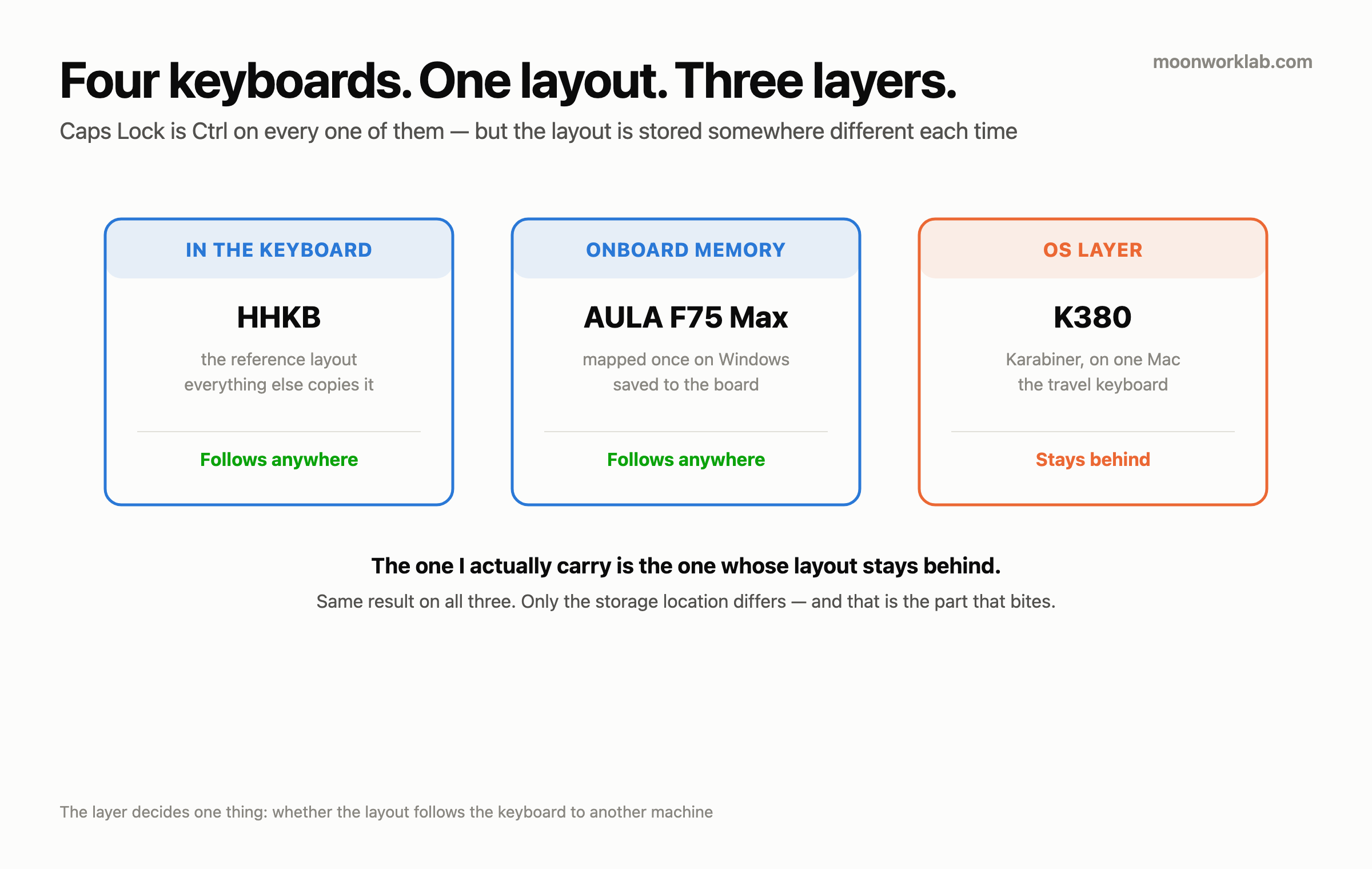
Four keyboards, one layout — and it lives in three layers
The HHKB is my absolute reference. The other three are all set up to match its layout. The Caps Lock position gives me Ctrl or Command, and the rest matches as far as each board allows. Not one keyboard on my desks has a working factory Caps Lock left on it.
That’s why this post has no HHKB disaster story in it. At first I thought that was a hole in the draft, because three of the four have an incident and one of them was silent. It wasn’t a hole, it was the conclusion. There’s no friction on that board because I removed the friction on the other three instead. Rather than fitting my hands to a keyboard, I fitted the keyboards to my hands.
April is explained by that. The prefix I picked had to be “comfortable on both the K380 and the HHKB layout” — one binding, working across two layouts. That’s the standard of someone keeping a layout as a single set, and it’s the same direction I’m now pushing onto the hardware. What I don’t have is a note saying all four were already unified back in April. I know the direction matches, and the state at that point I don’t know.
The same layout, three different homes
This is the part of the post I worked out last. The layout is a single set, and the layer that set is held in differs per keyboard.
| Keyboard | Which layer holds the layout | Plugged into another machine |
|---|---|---|
| HHKB | The keyboard itself — it’s the reference layout, so there’s nothing to match | It comes along |
| K380 | The OS layer — Karabiner on the Mac maps it per device | It doesn’t come along (that Mac only) |
| AULA | The hardware layer — mapped on Windows, saved into the board’s onboard memory | It comes along |
The OS layer is verifiable in a file. The Mac I sit at to code runs Karabiner-Elements, and its configuration matches keyboards per device. Each device gets its own modifier mapping. The Logitech device entry is six lines long, and one of those six sends caps_lock to left_command. A migration note from 26 April 2026 reads “device (K380) enable + 6 mappings rebuilt”. Same six.
The hardware layer is something I only worked out while writing this. I saw that the AULA wasn’t in that configuration file and I called it a hole, because it isn’t in the Mac’s modifier settings either and the layout was still the same. It wasn’t a hole, it was a different layer. The AULA gets mapped on Windows and baked into the board’s onboard memory. Bake it once and the layout follows the board into the Mac. The line was already sitting in my equipment notes — “mapped, then saved onboard → identical behaviour on Mac, Windows or iOS.”
And this is where unification sent me a bill. That mapping software is Windows only, which is the next section. So to build a layout I would be using on a Mac, I had to go through a Windows machine. That job was a slog. How long it took and how many times I redid it, I never recorded. That’s why this section has no number in it. The only numbers in this post are two changes in seven days, and three months.
The point is that a layout has more than one layer to live in. If the keyboard won’t open up, do it in the OS. If the keyboard won’t attach to the OS, bake it into the board. Either way the result is the same single layout.
There’s one thing none of those three layers could move. All four keyboards got the layout. Not one of them got my device switching. That’s further down.
The four
The table first. Every spec below is either the manufacturer’s figure or a line out of my equipment notes, and none of it is a measurement of mine. Weight, noise, battery life — I measured none of them.
| Switch | Layout | Connection | Device switching | Where it is now | |
|---|---|---|---|---|---|
| HHKB Pro Hybrid Type-S | Topre electrostatic capacitive, 45g | HHKB 60% | Wired / BT | 4-device pairing | Desk 1 (daily) |
| AULA F75 Max | Mechanical | 75% | Wired / 2.4GHz / BT (3 modes) | Fn+1/2/3 combo · 3 channels |
Desk 2 (daily) |
| Logitech K380 | Membrane | 84-key compact | Bluetooth only (no wired) | F1/F2/F3, one key · 3 channels |
In my bag — for going out |
| NuPhy Air60 HE | Magnetic Hall effect | 60% | Wired / 2.4GHz / BT | (varies by model) | Not on my desk |
I’m not writing down where desk 1 and desk 2 are. That they’re two different places, and that I use both every day, is everything this post needs from them.
A correction: the AULA switch cell in that table originally said “magnetic Hall effect”, copied out of my own note. That’s wrong. The board is mechanical. The only magnetic-switch keyboard I own is the NuPhy. I caught it mid-draft because my own words and my own note disagreed, and I fixed the note. Notes rot when they sit, and this is the same failure I wrote about with memory files — this time writing a post is what caught it.
HHKB Professional Hybrid Type-S — the board everything else was matched to
Topre electrostatic capacitive 45g, the Type-S silenced sliders, DIP switches for layout customisation, Bluetooth pairing across four devices. 45g is the manufacturer’s figure, not something I measured.
This board is the reference for everything above. The other three were matched to it. The prefix incident started here too — this layout is what forced the first change, and half of the final selection criterion points back at it.
The use recorded in my equipment notes is “quiet typing / MacBook pairing”. A keyboard with silenced sliders sits on one of the two desks. Whether those two facts connect — whether it’s there because it’s quiet — I never wrote down, so I won’t present it as a reason. What I know stops at which desk it’s on.
AULA F75 Max — the most features of the four, configurable on Windows only
Three connection modes (wired, 2.4GHz, Bluetooth), three Bluetooth channels, three onboard profiles, and OS mode switching (Fn+W Windows, Fn+Q Android, Fn+E Mac). On connectivity and storage it gives me more than the other three do.
Device switching is Fn+1/2/3. Coming off the K380’s single key, that combination catches me every time. One finger turns into two fingers, and that’s all it is, but the difference lands on every single switch.
And this is the most expensive part of the post. The remapping and macro software for this board is Windows only, needs administrator rights, and only sees the keyboard over wired USB. Connected over 2.4GHz or Bluetooth, the software can’t see the keyboard at all.
The machine I sit at to code is a Mac mini. So customising this keyboard means moving over to a Windows desktop, plugging in a cable, and installing a program. There’s a Mac mode inside the keyboard, and the configuration can’t be done from a Mac.
I went down that path myself. That’s why the layout from the last section is in this board — I built a Mac layout on a Windows machine and baked it in. It was a slog. In exchange, once it was baked, it stays put when I plug the board into the Mac.
I had a Windows desktop, so nothing blocked me. Anyone without a Windows machine has no path here at all. The hardware is paid for in full, and the remapping and macros stay shut.
Where my experience ends: mapping it on Windows and saving it onboard is something I did with my own hands. The administrator rights and the wired-USB requirement are lines I copied into my notes from the official documentation, and I never verified either condition on its own.
One more, and it’s the thing I’d have liked to know before buying: Fn+Esc is already taken. A short press toggles Fn lock, and a three-second hold is a factory reset. Everything baked into onboard memory goes with it. On the K380, Fn+Esc is the F-Lock toggle, so carrying a K380 habit straight across lands right on it. That’s why my plan document has Fn+Tab written in as the toggle key.
I have never pressed it and lost anything. I found it in the documentation while planning the mapping, and I moved my toggle key elsewhere. This isn’t a story about getting wiped. It’s a story about reading a document before writing a key into a plan.
Logitech K380 — the cheapest, the only one that gets this right, and it’s on neither desk
F1, F2, F3. One finger. Done.
Press one key mid-sentence and the typing carries on into the next paired machine. There’s no modifier involved. That sounds like nothing, and it stops being nothing when I cross between machines several times a day.
The other three all do multi-device pairing. Only the K380 does it with a single key.
And this keyboard isn’t on either of my desks. It’s the one I carry when I go out. Two of my equipment notes say the same thing — the use is “portable”, and the index has it as “portable / multi BT”.
The reason is plain enough. Both desks already have a full keyboard sitting on them. HHKB on one, AULA on the other. There’s no space left for the K380 to land on.
So this is where that leaves me. My favourite feature across all four is attached to the one keyboard I use at neither desk. The two places I sit down every day don’t have it, and the board that does have it is in a bag. I missed it enough to write a whole project plan about it, which is further down.
The layout is the same on this one too — it’s the device those six mapping lines are attached to. This is the only one of the four whose layout lives in the OS. Leave that Mac and it doesn’t follow, and of all four boards this is the one I carry out with me. Whether that has ever actually caught me out there, I have no record of.
One limit: there’s no wired mode. Bluetooth only. If the batteries die or the pairing goes wrong, there’s no fallback.
What I don’t know: how long the batteries actually last. I’ve never measured it, and I never wrote down a replacement interval either.
NuPhy Air60 HE — I bought it to find out whether low profile suits me. It’s off my desk.
60%, magnetic Hall effect, analogue actuation, rapid trigger. This is the only magnetic-switch keyboard I own.
It’s also the one keyboard in this post with a verdict on it, and the verdict is that it isn’t on my desk.
Why I bought it is clear enough. I had never used magnetic Hall effect switches or a low-profile board, so I bought one to try both. I didn’t need the spec, I was curious about the feel. Buying something to try a thing I haven’t tried is still a reason I stand behind.
The result: low profile didn’t suit my hands. And here’s the important part of this paragraph — it didn’t come off my desk because it broke, and it didn’t come off because the switches were bad. This is not a statement about product quality. The shape didn’t fit me. Those are two different conclusions, and the second one is what reviews are worse at separating out.
What I didn’t measure goes in as well. I have never compared low profile against normal height under controlled conditions. I never measured the height difference in millimetres, and I have no record of what my wrists do after a long session on it. What I have is one outcome — this keyboard isn’t on my desk, and the other three are still in use. That’s a verdict from my hands rather than a measurement, which is exactly why I won’t write it up as “low profile is bad”.
The cost: I don’t know the amount, because there’s no purchase record. What I do know is the price in the other sense. A keyboard I bought to check something I hadn’t tried isn’t used anywhere in my coding setup. That’s the one “don’t buy this” in this post that I earned personally.
And my plan to evaluate magnetic switches was riding on this single board. When the low profile pushed it off my desk, there was no magnetic switch left on either desk. I never reached any conclusion about the switches themselves — the shape got in the way first, and I’ve never gone back to separate the two variables.
Three months of not doing a one-hour job
I wrote a plan to reproduce the K380’s F1/F2/F3 on the AULA. It’s dated 14 May 2026.
The plan was specific. Three macros (BT_Switch_1/2/3), Fn+Tab as the toggle key, saved into onboard slot 1, channels assigned as F1 = Mac mini, F2 = Windows desktop, F3 = phone. I wrote down the time it would take, too — 30 minutes for phase 0, 30 minutes for phase 1. An hour, in my own words.
Today is 16 August, and that to-do is still unchecked. The project folder got moved into a “later” archive.
Three months. For an hour of work. And the target is a keyboard I put my hands on every day while coding. This isn’t a piece of gear I ignore.
Set it next to the layer table and it gets a bit funny. Same keyboard, same Windows machine, same software, same onboard memory. I built the layout there, and I still haven’t built the switching. Two jobs that end in the same place with the same tool, and only one of them is done.
Why I didn’t do it isn’t written in the plan — I didn’t leave a reason on every day I pushed it back. My read: without the layout I get caught daily, and without single-key switching I still get there with two fingers. I fixed what hurt and left what was merely inconvenient. That’s interpretation, not measurement.
One thing is certain. I didn’t skip it for lack of friction. I went through that same friction for the layout. And three months is a measurement in its own right.
The layers come back one more time here. A layout has several of them, so a closed one can be routed around. Device switching doesn’t work that way, and my own plan says so in its scope section: “emulating BT switching with host OS macros (Karabiner / AHK) — mechanically impossible”. The OS layer is shut, so baking it into the board is the only road there is.
What I took from that: when I buy a keyboard I think “I can change that in software later”. If that software wants a different OS, a different machine and a cable, the feature is half absent. I paid that price once, and I’ve been not paying it for three months on the second one.
Don’t do these
- Don’t retrain a pair of hands when the keyboard is the fixable part. All four of mine carry the same layout now, so the Caps Lock position does the same thing at either desk. In April the order was the other way around — I changed the keyboard, then fixed the configuration twice. Reversing that order cost two changes in one week.
- Don’t fit the configuration to one keyboard. I only picked a prefix that works on both layouts after tearing it up twice in April. That combination hasn’t changed since, and the keyboards have. Fitting it to both layouts first would have removed the second change entirely.
- Don’t conclude a layout can’t be moved. There’s more than one layer. I saw the AULA missing from my Karabiner configuration and wrote “I don’t know where this keyboard’s layout comes from” into the draft, then deleted it. Not in the OS means it’s in the board. It runs the other way too — if the board won’t open up, the OS holds it.
- Don’t buy an AULA F75 Max if a Mac is the only machine around. The hardware is good and the remapping software is Windows only, administrator only, wired USB only. A Mac mode (
Fn+E) inside the keyboard doesn’t let a Mac configure it. I built my Mac layout on a Windows machine and baked it into the board. Without that path, remapping and macros stay closed. - Don’t buy an untried form factor off a spec sheet. I bought one board to experience a low profile, and it came off my desk for its shape rather than its performance. Switch type, actuation and polling rate are all printed on the sheet. Whether the height fits my hands is not. Bad products get filtered out by reviews, and a shape that doesn’t fit doesn’t get filtered by anything. That’s the more expensive one.
- Don’t buy a K380 if wired matters. Bluetooth only. There is no wired fallback at all.
- Don’t carry a K380 habit straight onto another board.
Fn+Escis the F-Lock toggle there, and a three-second hold on the AULA is a factory reset that takes the whole baked layout with it. I read that in the documentation while writing a plan, and moved my toggle toFn+Tab. I’ve never pressed it. - Don’t count “customisable in software” as a feature. Check which OS that software runs on first. I went down that path once for the layout, and the one-hour second job that ends in the same place is three months old. Connecting the two is my interpretation, and the measured part is three months.
- Don’t pick a keyboard by feel when several machines are in play. What actually charged me was never the switches. It was key positions and the device switching method. Those are what forced two prefix rewrites, and what created a three-month backlog.
- Don’t copy specs out of my own equipment notes. Writing this post I found my note calling the AULA switches magnetic Hall effect. They’re mechanical. The note was wrong. Copying it straight into the table would have published a wrong spec.
Honest limits
What isn’t in this post goes first. This is where it parts company with other keyboard reviews.
- I didn’t measure typing speed. Which keyboard is faster, I don’t know. Measuring it needs controlled conditions and I didn’t set any up.
- I didn’t measure noise. Calling the HHKB Type-S quiet is a product description, not a dB reading of mine.
- I didn’t measure battery life. On any of the four. There isn’t even a charging interval written down.
- I didn’t compare how they feel. Electrostatic capacitive, mechanical, Hall effect, membrane — those are all labels I copied, not judgements I made. Which one is better, I don’t know.
- I didn’t compare low profile against normal height under controlled conditions. The conclusion above, that low profile didn’t suit my hands, is a verdict from my hands and not a measurement. No height difference, no record of a long session.
- I never evaluated magnetic switches. My only magnetic board was the NuPhy, and that one board came off my desk over its shape first. I’ve never gone back to isolate the switch type.
- I didn’t record the time unifying the layout took. I remember the AULA mapping being a slog, and I have nothing written about how many hours or how many retries. Same for the other three. That’s why that section has no number in it.
- I don’t know whether the HHKB layout is held by its DIP switches or by remapping on the Mac. I never checked which, so the layer table calls that row “the keyboard itself” and leaves it there.
- I have no record of what happens when the K380 layout leaves that Mac. It lives in the OS layer, so it shouldn’t follow, and I never wrote down a moment where that actually caught me.
- There’s no durability data. Which keycaps are shining, which switch died first — I never recorded any of it, so I’m not writing it.
- I’m not writing prices. The purchase records are gone. Writing a price from memory isn’t a measurement. That the K380 was the cheapest of the four is something I know as the person who bought them, and the amounts I don’t know. That’s why no figures appear anywhere in this post.
- I didn’t measure 2.4GHz interference. All four can connect wirelessly and two of them use a 2.4GHz dongle. My mouse is wireless too. Whether anything slowed down from a crowded band, I’ve never measured.
- I didn’t count how many times a day I cross between machines. “Often” is everything I know, which is why there’s no “N times a day” in here.
- I still own all four. Nothing was sold. One of them came off my desk, and that’s the strongest conclusion in this post.
What I’d look at before buying another one
- One machine and one desk, and none of these costs apply. Choosing on feel is right in that case, and feel is exactly what I didn’t measure.
- Crossing between two machines every day is what reversed the order for me. I fixed the layout as one set first and matched the keyboards to it. In April I did that backwards and paid twice in one week.
- Which layer the remapping happens in is what actually separated my four. The HHKB carries its layout in the board itself, so it follows anywhere. The K380’s lives in the OS layer, so it only works on that one Mac — and that’s the board I carry out with me. The AULA’s lives in onboard memory, so it follows once baked, and the software that bakes it exists only on Windows, which made that one time expensive. Same layout in all three cases, different cost and different portability.
- Device switching had none of those three branches. “Emulating BT switching with host OS macros — mechanically impossible” is a line I wrote in my own plan. With the OS layer shut, baking it into the board is the only road, and when that road is blocked the thing simply doesn’t happen. The layout was the part I could fix. The switching wasn’t.
- How many presses a device switch costs is something I should have checked ahead of the switches. One finger becoming two turned into a three-month backlog for me.
- The cheap one won this category. The only board of my four with single-key device switching is the cheapest of them, and it’s a membrane keyboard. The other three pair with multiple devices as well, just never with one key.
- Three things I check now. First, whether the configuration software runs on the OS I sit at every day — if it doesn’t, that feature only exists on the spec sheet. Second, if the form factor is one I haven’t tried, I check it with my hands instead of off a sheet. I skipped that once, and that keyboard isn’t on my desk. Third, whether my layout goes onto the board at all, and whether it then stays in the board or in the OS. In the board it follows anywhere; in the OS it’s gone the moment I leave that machine.
Closing
What four keyboards actually taught me had nothing to do with switches.
Hands remember positions, not feel. And positions are something I can change. Four different objects carrying one layout is what that means, and that single layout is split across three places — one inside a keyboard, one in an OS configuration, one baked into a board’s memory.
I didn’t know that, so I trained two sets of hands instead and paid twice in one week. Then I reversed the order.
One thing I never fixed. Device switching has one layer and no more, and the one-hour plan to move it is three months old.
The layout was the part I could fix. The switching was the part I couldn’t. If there are two things worth looking at before buying, those are the two.