I Used My Own Extension for 30 Days. One Tester Found Three Bugs in an Hour.
I shipped a browser extension and used it every day for a month. Then I asked one person to try it.
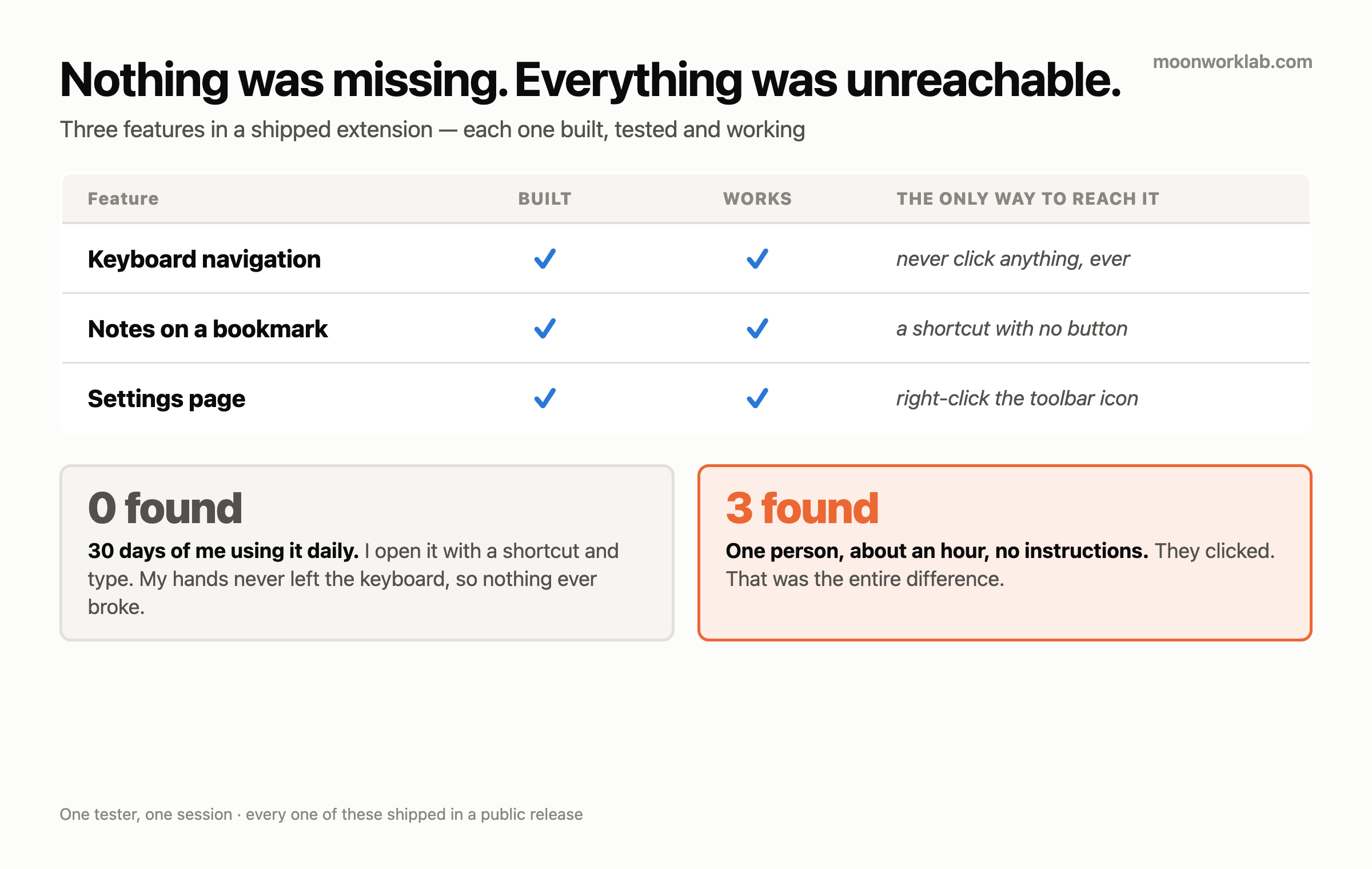
They hit three problems in about an hour. I’d hit none of them in thirty days.
What got me wasn’t the count. It was that all three were the same problem wearing different clothes. Nothing was missing. Everything was unreachable. Each feature they couldn’t find was built, tested and working — behind a door only I knew about.
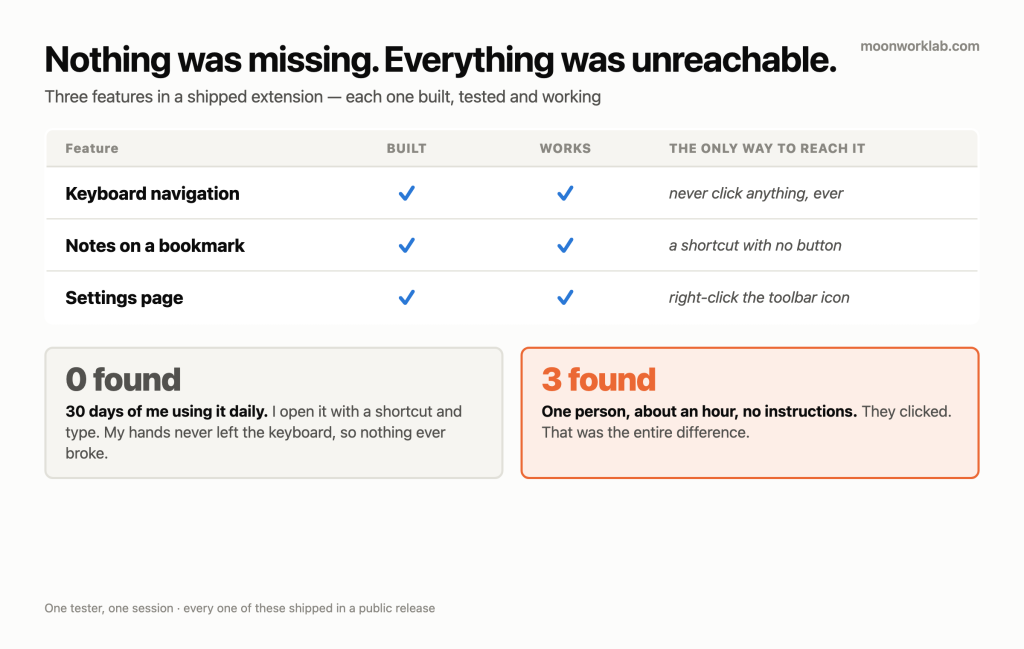
The three
I’m paraphrasing what they told me, because they were doing me a favour and not filing bug reports.
1. The keyboard stopped working if you touched anything
Their words, roughly: when this is open I’d expect the keyboard to just work — but if I click something, it stops.
They were right, and the cause was one line of binding. Every key handler was attached to the search box:
input.addEventListener('keydown', ...)Click the sort dropdown, the AI button, or empty space, and focus left that input. Arrow keys, Enter, Escape and the notes shortcut all died at once. The window looked fine and answered nothing.
I never saw it because I never clicked. I open it with a shortcut, type, and hit Enter. My hands never left the keyboard, so focus never left the box.
The fix moved the handlers up to document, let native controls keep their own keys, and sends you back to the search box the moment you type a printable character.
2. A feature only I knew existed
They asked to be able to use it with the mouse. I went looking for what they meant and found the notes feature — reachable only by a keyboard shortcut. No button, no menu, no hint.
To a mouse user that feature didn’t exist. Not “hard to find.” Did not exist. I’d built it, shipped it, written it up, and left the only entrance invisible.
Now every row shows a notes button on hover, which doubles as the place people learn the shortcut.
3. The settings page had no door
Two messages, close together: I can’t see where the AI install location is, then why am I not seeing anything — screenshot me where it is.
The settings page was reachable exactly one way: right-click the toolbar icon, choose Options. That’s a path you know because you built the thing. Nobody discovers it.
It’s a gear button in the popup footer now. One click.
The one I found myself, which was worse
Chasing the first bug I found something they never got to.
The call that puts the cursor in the search box ran after three async steps — translations, then the bookmark tree, then notes. So on a profile with a lot of bookmarks there’s a window where the popup is on screen, looks ready, and swallows what you type.
And if you clicked during that window, you lost the cursor for good — straight into bug one.
My own bookmark set is small enough that the window is invisible. The bug scales with how much you use the thing it’s for. The more bookmarks you have, the worse it gets. I’d built the failure to hide from exactly the person most likely to hit it.
Focus is set immediately now, and again when the window regains focus.
Then my own error message lied to me
This is the part I keep thinking about.
They sent a screenshot of an error. My extension can talk to a local model, and when that fails it said, in effect:
Couldn’t connect to
localhost:11434(Failed to fetch). Is Ollama running withOLLAMA_ORIGINSset?
I wrote that message. It sent them the wrong way.
So I measured what each failure actually looks like on the wire. Two conditions, and they don’t resemble each other:
| What’s wrong | What the browser sees |
|---|---|
| Nothing listening on the port | The fetch is rejected outright — “Failed to fetch” |
| Server up, this origin not allowed | A response arrives: HTTP 403 |
Read that again against my message. “Failed to fetch” can’t be an origins problem. A rejected origin still answers — it answers 403. If you’re seeing “Failed to fetch”, the server isn’t running, and I was telling people to go edit an environment variable.
My message named the one cause that was structurally impossible given the symptom it was printing.
The code now tags which failure happened and says a different thing for each:
if (r.status === 403) throw tagged('forbidden', 'HTTP 403');
if (!r.ok)            throw tagged('http', 'HTTP ' + r.status);
// fetch rejected entirely:
throw tagged('unreachable', netErr.message);
Three states, three messages. unreachable says the server isn’t answering. forbidden says it’s running and refusing this extension, and that’s where the environment variable advice belongs.
I have a standing rule for myself about this: an error string is an observation, not a diagnosis. I wrote that rule after a token check told me a credential was invalid when it was fine — the endpoint just wasn’t scoped for it. Then I turned around and shipped the same mistake, in my own product, in a message I’d written by hand.
Knowing the failure mode didn’t stop me from building it.
One more, from writing the help text
Rewriting the setup instructions, I found the Windows one-liner had been bash syntax the whole time. Setting a variable inline as VAR=value command works in a shell I use and does nothing in PowerShell, which needs $env:VAR="value"; command.
Every Windows user who copied that line watched it fail. I’d never run it on Windows.
And in the same pass: three help strings were tagged as plain text instead of HTML, so labels rendered as <b>PowerShell</b> — tags and all — on screen. I only caught it by rendering the page and looking at it with my eyes. There’s a regex check for that now.
Don’t do these
- Don’t confuse “I use it daily” with “I’ve tested it.” Thirty days of my own use found zero of these. I wasn’t testing. I was performing the one path I built.
- Don’t ship a feature whose only entrance is a shortcut. If there’s no visible affordance, it doesn’t exist for anyone but you.
- Don’t write an error message that names a cause. Print what you observed. Name a cause only where you can tell the causes apart — which means checking, not guessing.
- Don’t paste a command you’ve never run on the OS you’re telling people to run it on. Mine was wrong for the entire life of the feature.
- Don’t count “the tests pass” as having looked. The literal
<b>tags on screen broke nothing and threw nothing. I had to open it and look.
What this actually cost
Thirty days of a shipped product where the keyboard died on any click, a feature was invisible to mouse users, the settings page had no discoverable route, and the AI error told people to fix the wrong thing.
Finding all of it took one person, one session, no instructions. I didn’t write a test plan. I asked someone to use it and shut up while they did.
That’s the whole method, and I’d been avoiding it for a month — not deliberately, just by never getting round to it. The cheapest tool I had was the one I hadn’t used.
The pattern I’ll carry out of this: when someone says a feature is missing, check whether it’s missing or whether it’s just unreachable. Three times out of three, mine was built and working and had no door.