I Rebooted to Fix 129MiB Free. It Broke My AI Agent’s Login for Three Hours.
My home server ran out of disk. I fixed it, rebooted, and rebooted, and rebooted, and three hours later I realized my remote-access bridge was dead. That’s the thing that lets me run my AI coding agent from my phone. The logs were clean. No errors anywhere. It just wasn’t answering.
This is a post about that chain. A disk alarm, a wrong theory I nearly built a workaround around, and the actual bug: an AI agent breaking its own login because of a setting it wasn’t even using.
The math didn’t add up
Free space on my always-on Mac mini dropped to 129MiB, out of 228GiB total. That mini is the control tower for my self-hosted AI setup. I’d downloaded a game that said it needed 9GB. I’d lost more than 20GB. Those numbers don’t match, and I don’t like it when they don’t match.
I split the difference into two separate problems instead of guessing:
- 9.3GB was leftover game data that never got cleaned up (a 7.6GB pack file plus 1.7GB unpacked next to it).
- The rest was memory pressure quietly inflating the OS swap volume to 16.1GB, completely unrelated to the game.
Two causes, same symptom. If I’d only looked at the game folder, I’d have “fixed” it and watched the disk fill right back up.
Cleaning it up was the easy part
Clearing about 12.5GB of stale desktop-app cache and bundle data brought me from 129MiB to 14GiB, immediately. A reboot released the swap volume too. Free space went to 51GiB, swap dropped to 2.0GB. I checked again just now, while writing this: 49GiB free, swap still 2.0GiB. The 2GB gap from 51 to 49 is normal drift, not a regression.
| Point in time | Free space | Swap used |
|---|---|---|
| Alarm (before cleanup) | 129MiB | 16.1GB |
| After clearing app cache/bundles | 14GiB | 16.1GB |
| After reboot | 51GiB | 2.0GB |
| Now (few days later) | 49GiB | 2.0GB |
Disk problem solved in under twenty minutes. I closed the laptop feeling good about it. I shouldn’t have.
The reboot broke something, and hid it well
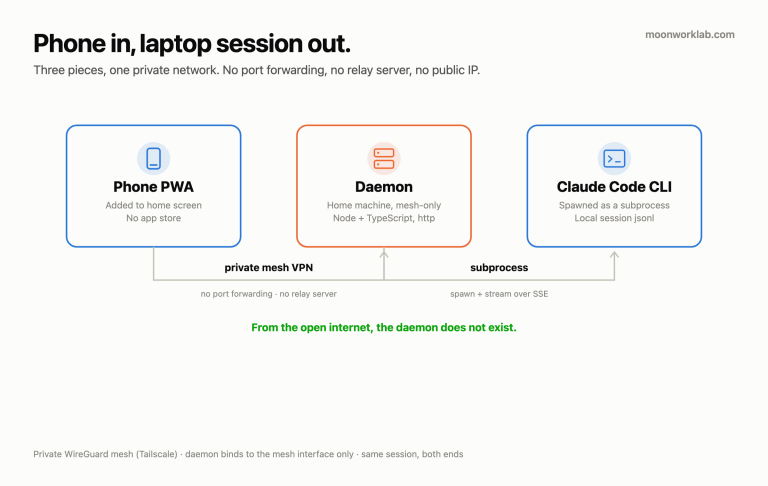
Rebooting the Mac mini restarts everything running on it. That includes the daemon for my remote-access bridge — a self-hosted setup that lets me open a web app on my phone and drive my AI coding agent from anywhere. After the reboot, that bridge just stopped answering.
I didn’t notice for about three hours. That’s the real cost of this incident. Not the disk. The blind spot right after fixing the disk.
Here’s what made it hard to catch: the daemon’s logs were completely clean. No errors, no crash, no stack trace. It looked idle, not broken. I’ve said this before and I’ll keep saying it — a clean log isn’t proof something’s healthy. It’s only proof nothing logged an error. Those aren’t the same thing.
The theory that almost sent me down the wrong hole
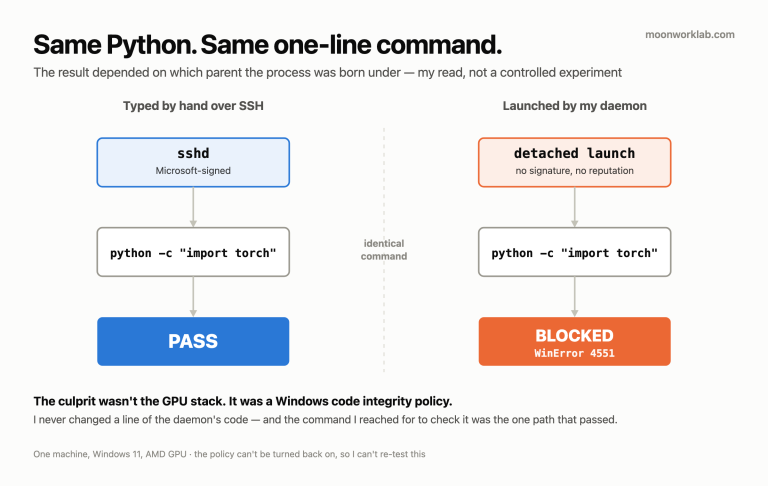
My first working theory: the daemon process had no controlling terminal, and some newer version of the CLI it calls just hangs without one before it initializes. It’s a plausible story. It’s true for some tools, genuinely, and it would’ve explained a silent hang well enough that I nearly wired in a pseudo-terminal library to fake one for the daemon.
I didn’t, because something nagged at me. Every time I tested from inside my desktop app’s own session, the same command worked fine. If the TTY theory were right, that shouldn’t have been so consistent. Turned out the app’s own environment was quietly routing around the real problem a different way. My “successful” tests were passing for a reason that had nothing to do with what I was testing. I only killed the TTY theory by stripping everything down — no app context, a bare environment, nothing but the command itself — and watching it fail the exact same way with a terminal present. If a TTY were the fix, that run should’ve worked. It didn’t. Theory dead.
Don’t debug from inside the one context that might be masking the bug
This is the real antipattern here, and it isn’t specific to this bug. If the only place your fix seems to work is the same environment where the failure started, that’s not confirmation. That’s a warning sign. My desktop app’s session was never a clean test of the daemon’s behavior, because it wasn’t running the same way the daemon runs. I burned real time on that, before I reproduced the failure from zero instead of reasoning harder about a theory that already fit the symptoms a little too well.
What was actually happening
The real cause: my AI agent’s desktop app writes a setting into a shared config file, for an experimental feature I wasn’t even using. That setting only does anything while the desktop app itself is open. Except the background daemon reads the exact same shared config file. Just having that setting present, regardless of its value, made the agent’s CLI assume it should authenticate with an API key instead of my subscription login. The daemon has no API key. It’s subscription-only. Every login attempt failed, silently, in a retry loop that never surfaced as an error.
Nobody changed a value here. A setting for a feature I don’t use was enough to break a login path for a completely different process, just by existing in a file two unrelated things both happened to read.
The fix wasn’t to touch the setting
I didn’t patch the value, and I didn’t turn the experimental feature off. I changed how the daemon launches its CLI process, so it explicitly only reads project- and local-level config, never the shared user-level file the desktop app writes to. The desktop app can keep writing that setting forever, for whatever feature it wants. The daemon simply never sees it. That’s structural isolation, not a one-time patch — the same bug can’t come back through the same door.
One good thing came out of the whole afternoon. I ended up writing a small health-check script that pings about 15 of my self-hosted services, and draws a status map of how they’re wired together around the Mac mini. Wasn’t the goal. Still useful.
Closing
Letting an AI agent run your own infrastructure means it can, and eventually will, break its own execution environment. Not through malice, not through a bad decision — just a leftover setting nobody was watching. The lesson isn’t “audit every config file.” It’s narrower than that, and more useful: when something looks broken but nothing is logging an error, don’t settle for the first theory that fits. Reproduce it from zero, outside whatever context might be quietly covering for it. That’s the only way I actually found this one.