I Read the Same Value Five Times and Called It Verified. It Was Backwards.
I read the same value five times in a row and wrote down that it was verified.
It was backwards. And the tool I read it with doesn’t support reading that value at all.
Here’s the part that stayed with me. The command didn’t fail. It returned a plausible number, exited 0, and did it again every time I asked. There was no version of running it more carefully that would have caught this.
What I was trying to do
Two monitors on my desk, each wired to two machines — a Mac and a Windows box. Switching which machine I’m looking at means changing the monitor’s input source. That’s a DDC command, and on Apple Silicon the tool for it is m1ddc.
I wanted to script it. To script it I needed the input codes, so I asked the monitor which input it was on.
m1ddc display 1 get input
15
I ran it three times. Then five. Fifteen, every time. The Mac was the machine I was querying from, so I wrote down 15 = Mac and moved on.
15 was the Windows box
Six days later I confirmed it the only way that actually counts: I fired set input 15 and watched the screen. The monitor handed itself to the Windows machine.
Not “15 is probably the PC.” The opposite of what I’d recorded, demonstrated in front of me.
Which means every script I’d written on top of that mapping did the reverse of what I wanted. And it explains something from two months earlier — an earlier attempt at this project failed and I shelved it, because switching inputs “didn’t work.” It worked. I was sending the wrong code.
That’s the price tag on this one: the project sat dead for two months over a number I never actually measured.
The tool told me, in the help text
Here’s m1ddc‘s own documentation for what get supports.
get luminance        - Returns current luminance (if supported by the display).
    contrast         - Returns current contrast (if supported by the display).
    (red,green,blue) - Returns current color gain (if supported by the display).
    volume           - Returns current volume (if supported by the display).
Four entries. input isn’t one of them.
It is there under set, documented properly, with the standard codes spelled out:
set input n - Sets input source to n, common values include:
              DisplayPort 1: 15, DisplayPort 2: 16, HDMI 1: 17, HDMI 2: 18, USB-C: 27.
So writing is supported and reading isn’t. Ask it to read anyway and it hands you a number.
And look at that code list against my desk. The Windows box reaches that monitor over DisplayPort. DisplayPort 1 is 15. The documented table said “Windows” and I had it written down as “Mac”. The answer was sitting in the help output the entire time — I trusted a measurement over a spec sheet, and it wasn’t a measurement.
I re-ran it tonight
Same machine, same tool, same monitor, same command as August 17th.
get input #1 -> 17
get input #2 -> 17
get input #3 -> 17
get input #4 -> 17
get input #5 -> 17
exit code: 0
Seventeen now. It was fifteen then. Five stable reads both times.
Two different answers, each one perfectly repeatable, from a query that was never supported. Whatever that number is, it isn’t the monitor’s active input. Why it’s 17 and not something else, I don’t know. I’m not going to guess.
The other monitor fails loudly, and that made it safe
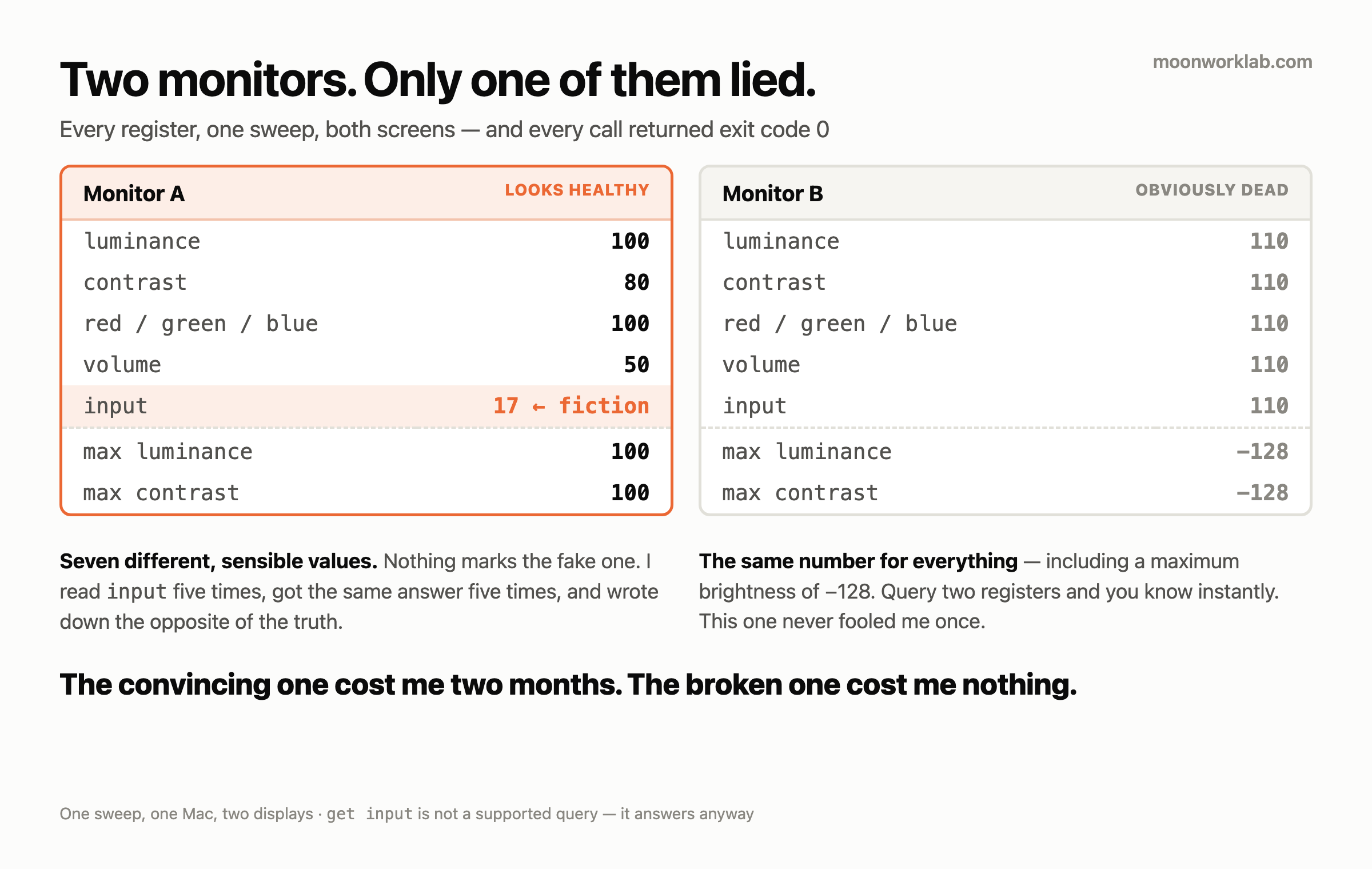
While I was in there I swept every register on both monitors. This ran at 02:16 tonight, one pass, values verbatim.
| Register | Monitor A | Monitor B |
|---|---|---|
luminance |
100 | 110 |
contrast |
80 | 110 |
red |
100 | 110 |
green |
100 | 110 |
blue |
100 | 110 |
volume |
50 | 110 |
input |
17 | 110 |
max luminance |
100 | −128 |
max contrast |
100 | −128 |
Monitor B returns 110 for everything. Brightness, contrast, all three colour channels, volume, input. Those can’t be the same number. That monitor doesn’t answer DDC at all, and something in the path turns silence into a digit.
It also reports a maximum brightness of −128. A negative maximum. It looks like a signed byte overflowing, but I didn’t read the source, so that’s a guess and I’m labelling it one.
Every one of those calls exited 0.
Now put the two columns side by side, because this is the whole point.
- Monitor B is broken in a way you catch immediately — if you query two registers. Brightness 110, contrast 110, and you know. It has never once fooled me.
- Monitor A looks healthy. Seven registers, seven different, sensible values. Brightness 100, contrast 80, volume 50. Nothing about that output says “one of these is fictional.”
The obviously broken one was the safe one. The one that answered well is the one that cost me two months.
What repetition actually measures
Five identical readings felt like verification. It wasn’t. Repeating a measurement tests precision. It cannot test accuracy.
If the instrument is wrong, running it again returns the same wrong number with more confidence attached. That’s the entire failure. I didn’t lack rigour — I applied rigour to the one axis that couldn’t detect this.
Accuracy needs a second path. I had three available and used none of them:
- The help text. Would have taken ten seconds and settled it outright.
- The wiring. I knew which cable went where. The documented code table matched the cable, not my reading.
- My eyes. Send the command, look at the screen. This is what finally caught it, six days late.
I’ve been here before. In the fourteenth post my local model ran at two thirds speed with a clean log and no errors. In the fifteenth a translator reversed my meaning and reported success. Same shape every time: the tool returns something, the something is wrong, and nothing in the output marks it.
Don’t do these
- Don’t count repetition as verification. Five identical readings and one reading are the same evidence about accuracy: none.
- Don’t skip the help text because the command already works. Running without error doesn’t mean the argument is supported. Mine ran clean for six days.
- Don’t trust a reading over a documented spec without deciding why. I overrode a published code table with a number I liked better, and never noticed I’d made that choice.
- Don’t read this as “m1ddc is bad.” It isn’t.
set inputdid exactly what its documentation said, and the code table was right the whole time. I called something the docs never offered. The bug worth naming is thatgetanswered instead of refusing. - Don’t ask one register when you can ask two. One value tells you nothing about whether the bus is alive. That’s the only reason I caught Monitor B.
What I do now
Anything I can’t verify by a second path goes in the config as verified: false, and nothing marked false is allowed to fire a command. That flag is the whole fix. It costs nothing and it would have saved two months.
The state of the switcher gets tracked in a file I write myself, not by asking the hardware. I stopped querying the monitor for facts about the monitor. That sounds backwards until you’ve had one lie to you with a straight face.
And when I need to know something the tool won’t tell me honestly, I do the dumb thing. I send the command and look at the screen.