I Ran Qwen3-Coder 30B on an AMD RX 9070 XT — 47 tok/s, No ROCm Required
Search for how to run a coding LLM locally and the advice converges on one word: NVIDIA. CUDA is mature, every tutorial assumes it, and saying “I’ll use AMD” reliably earns you a reply telling you not to.
I used an AMD Radeon RX 9070 XT (16GB, RDNA4) anyway. Not out of principle — it was already sitting in my gaming PC, doing nothing between sessions.
Short version: Qwen3-Coder-30B-A3B runs at 41–50 tokens/sec on it, and I never installed ROCm at all.
This isn’t a victory lap. It’s a record of numbers I had to measure myself, because I couldn’t find them anywhere.
Why AMD at all
- The card was already in the machine. Extra spend: zero.
- Coding assistance is bursty. The GPU sits idle whenever I’m not gaming, and that felt like a waste.
- And honestly: “it doesn’t work” was getting repeated a lot, without anyone showing numbers.
The first wall: ROCm doesn’t know RDNA4 yet
The 9070 XT reports as gfx1201. It’s new silicon, and that causes two problems:
- Standard ROCm builds don’t recognize it — you need community or beta builds.
- There are reported HSA hangs on ROCm 7.1.1.
This is where most people give up. I nearly did.
So I went with Vulkan instead
Conventional wisdom says ROCm is the “real” path and Vulkan is the fallback. On RDNA4, that’s backwards.
Let me be precise about one thing: I didn’t benchmark ROCm myself. I never got far enough to run it, for the reasons above. What I did instead was follow community benchmarks reporting that Vulkan beats ROCm on RDNA4, and start there.
That call worked out, because Vulkan just ran — nothing installed beyond the normal graphics driver:
ggml_vulkan: Found 1 Vulkan devices:
ggml_vulkan: 0 = AMD Radeon RX 9070 XT (AMD proprietary driver)
             | fp16: 1 | bf16: 1 | warp size: 64 | matrix cores: KHR_coopmat
Note KHR_coopmat — cooperative matrix support, which means the matrix-acceleration kernels are available. That matters a lot for throughput.
Straight with you: every Vulkan number below is one I measured. There are no ROCm numbers here, because there’s no ROCm run here. If you want a head-to-head backend benchmark, this isn’t that post. What I can tell you is narrower, and I think more useful: as of August 2026, ROCm on RDNA4 isn’t something a normal user should have to start with. That’s RDNA4 specifically — older AMD cards are a different story.
The real problem: fitting 30B into 16GB
Qwen3-Coder-30B-A3B is a Mixture of Experts model. 30B total parameters, but only 3B active per token. That architecture is the whole reason this works on 16GB.
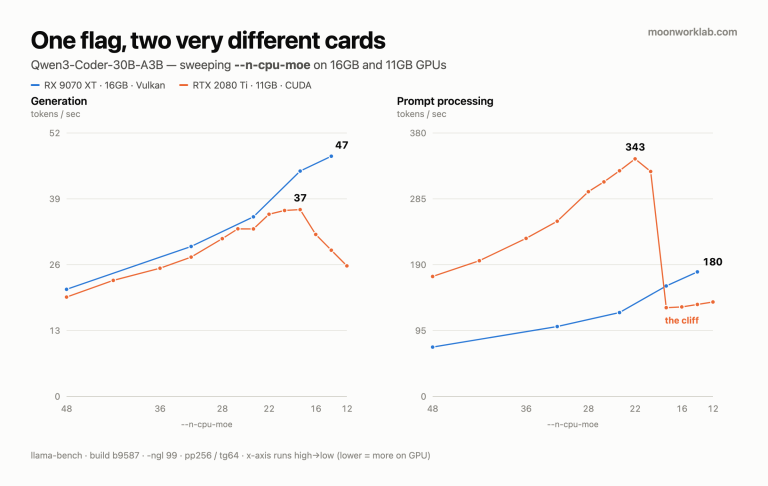
The flag that matters is --n-cpu-moe N, which pushes the expert tensors of N layers out to system RAM. Everything hinges on where you set it.
Set it too high and you’re slow. Set it too low and you run out of VRAM. So I swept it.
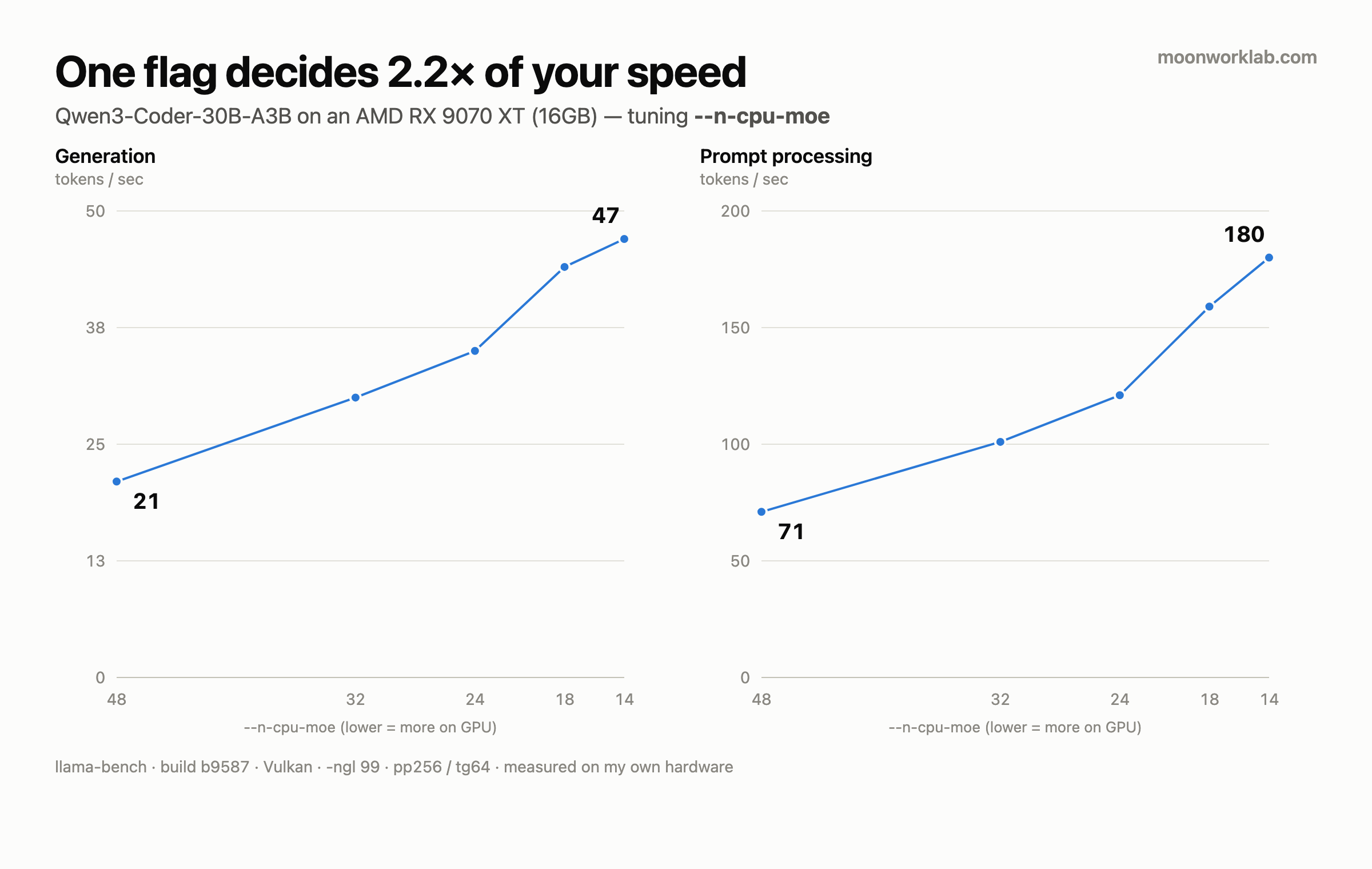
The n-cpu-moe sweep (measured)
--n-cpu-moe |
Prompt processing (pp256) | Generation (tg64) |
|---|---|---|
| 48 | 71 tok/s | 21 tok/s |
| 32 | 101 tok/s | 30 tok/s |
| 24 | 121 tok/s | 35 tok/s |
| 18 | 159 tok/s | 44 tok/s |
| 14 | 180 tok/s | 47 tok/s |
-ngl 99. Averages shown; the raw log keeps deviation too — at n-cpu-moe 14: pp 179.71 ± 0.42, tg 47.42 ± 3.78.14 is the sweet spot. Going from 48 down to 14 took generation from 21 to 47 tok/s — a 2.2× gain, same model, same hardware. Below 14 it runs out of memory.
I checked the opposite extreme too. With --n-cpu-moe 99 — every expert on the CPU — generation dropped to 17.9 tok/s.1 So this one flag spans roughly 2.6×.
VRAM at the sweet spot sits at 15.08GB of 15.9GB usable. A 0.8GB margin. It’s a tightrope.
1 That last figure came from an interactive session rather than llama-bench, so it isn’t strictly comparable to the table. Treat it as a rough floor.
Final configuration
-ngl 99 --n-cpu-moe 14 -c 16384 --parallel 1 --jinja| Backend | llama.cpp llama-server (Vulkan) |
| Model | Qwen3-Coder-30B-A3B-Instruct UD-Q4_K_XL (16.45GB) |
| Context | 16k |
| VRAM | 15.08 / 15.9 GB |
| Generation | 41–50 tok/s |
| Prompt | 180 tok/s |
Why 16k context: the model supports far more, but context eats VRAM I don’t have. 16k covers ordinary coding work, and anything that needs a huge context goes to a different tool anyway — which brings me to how I actually use this thing.
How I actually use it: split the roles
Trying to do everything with the local model is a mistake. I split the work instead:
| Stage | Who | Why |
|---|---|---|
| Planning & architecture | Cloud model (subscription) | Needs broad context and stronger reasoning |
| Writing code | Local Qwen3-Coder | High volume, repetitive — this is where token costs explode |
| Review & integration | Cloud model | Backstop |
The editor talks to the local OpenAI-compatible endpoint through Continue.dev.
Here’s the point: the stage that burns the most tokens is code generation, and that’s exactly the stage a local model handles well. Move that one stage off the cloud and the API bill goes away.
What’s actually bad about this
An honest list, because I haven’t seen one:
- Quality sits below frontier cloud models. Give it a narrow, well-specified task and it does fine. Give it something vague and it wanders.
- 30B is too slow for inline autocomplete. A much smaller model is the right tool there.
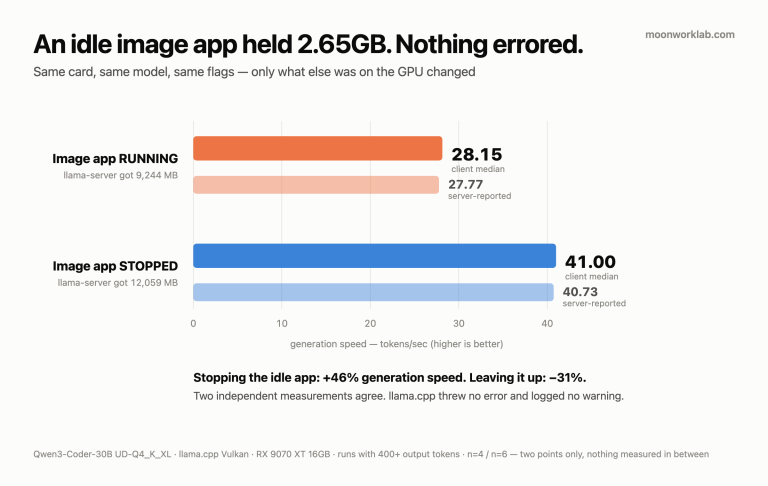
- The GPU is exclusive. If I’m gaming, I’m not running the model. There’s only one card.
- 0.8GB of VRAM headroom. One careless setting change and it dies.
- ROCm is unfinished business. I’ll revisit when the RDNA4 kernels mature.
So should you buy AMD for this?
- Buying new, purely for local LLM work? NVIDIA is still the safer bet. The ecosystem gap is real.
- Already own an AMD card, or want one machine for gaming and LLM work? It’s genuinely usable. 47 tok/s on a 30B-class MoE is fast enough for real work.
- The deciding factor isn’t the brand. It’s that a MoE model is the right answer for 16GB VRAM plus 32GB RAM. A dense 30B wouldn’t have fit at all.
Closing
“AMD doesn’t work” is half true. ROCm hasn’t caught up to RDNA4, but Vulkan is already there, and getting it running took nothing unusual.
I published the numbers because they didn’t exist when I went looking.
Next up: there’s a question this post doesn’t answer — which matters more, CUDA maturity or VRAM capacity? So I ran the same model on an RTX 2080 Ti (11GB): seven years old, fully mature CUDA, 5GB short on memory. The results split in a way I didn’t expect. Read that one here.
Related: the
--n-cpu-moevalue used here (14) was found by sweeping it. If you want the method rather than my numbers, see the tuning guide.